Our Products Early access

ERP VeriÇek

Turns your Logo data into reports and live dashboards inside Excel; no SQL, no copy and paste. Download the early-access version and try it for 15 days.

Why ERP VeriÇek?

The problem

Reports are rebuilt by hand every month

  • Lists from Logo are copied into Excel and formatted again, and the same job starts over every month.
  • Management dashboards are pieced together from several reports and never stay current.
  • Every custom report waits for someone who knows SQL.

Our answer

Set it up once, refresh in one click

  • The ready-made Logo package finds the company and period; reports and dashboards are set up in one step.
  • Pick your filters and get a table or a pivot; next month just press Refresh All.
  • Get any report by e-mail at the time you choose.

What sets us apart

Inside Excel, without touching Logo

  • The result is the Excel you know: Excel tables, pivots, the Data Model, slicers and charts.
  • Logo data is only read; queries are parameterised and the connection password is stored encrypted by Windows.
  • Turkish and English interface; it understands Logo's company and period structure and can combine several companies in one report.

Key features

Ready-made Logo packages

Core package: account statement, stock movements, sales analysis and sales dashboard, cash/bank, receivables ageing, finance summary. Accounting package: TRY and foreign-currency trial balance, cost-centre and project trial balance, general ledger detail.

Live dashboards

Charts and pivots that filter each other through slicers, KPI cards with targets; the dashboard refreshes in one click. Double-click a code to drill down to the detail.

Filtered reports

Date ranges, searchable multi-select, code and amount ranges; the result is an Excel table or a pivot. Measure totals, negative amounts in red, subtotals by code.

Scheduled e-mail

Reports or dashboards daily, weekly or monthly, with relative periods such as «last week» or «last month». An Excel attachment plus a summary in the e-mail, even with Excel closed.

Cell formulas

Pull Logo data straight into a cell with <code>=VCTOPLA</code>, <code>=VCSAY</code> and <code>=VCAD</code>, and build your own financial statements in your own layout. The Formula Builder writes the criteria for you.

Team catalogue

Publish your data sets, reports or dashboards to a shared folder and let colleagues take them in one click. Versions and conflicts are checked; passwords are never shared.

Product details

Intended usersFinans ve muhasebe ekipleri, satış yöneticileri, raporlama sorumluları, Logo iş ortakları
AccessExcel eklentisi (Windows masaüstü)
Setup / usageZip paketi ve tek tıkla kullanıcı başına kurulum; yönetici yetkisi gerekmez
Compatibility64-bit Microsoft Excel 2016 ve üzeri / Microsoft 365, Windows; Logo Tiger / GO (SQL Server)
Licence scopeErken erişim; kullanıcı başı yıllık lisans, 15 günlük deneme kendiliğinden; tasarım ve önizleme lisanssız

Download

Version: 0.9.0 34.9 MB 30.10.2026 Windows 64-bit · no separate .NET install needed
Download

Installation

  1. Extract the downloaded zip file into a folder.
  2. Right-click install.ps1 in that folder and choose “Run with PowerShell”; Windows will ask for administrator approval (UAC).
  3. When setup finishes, complete the wizard at http://127.0.0.1:<port>/kurulum, which opens in your browser.

The package is not digitally signed, so Windows SmartScreen may warn you: “More info” → “Run anyway”.

SHA-2566871618e8e85a5b10f852b34ef8b1a69d8be25006f457388817ad6275cbc0d2d

After downloading, verify the file is intact: Get-FileHash .\VeriCek-0.9.0.zip -Algorithm SHA256

Screenshots

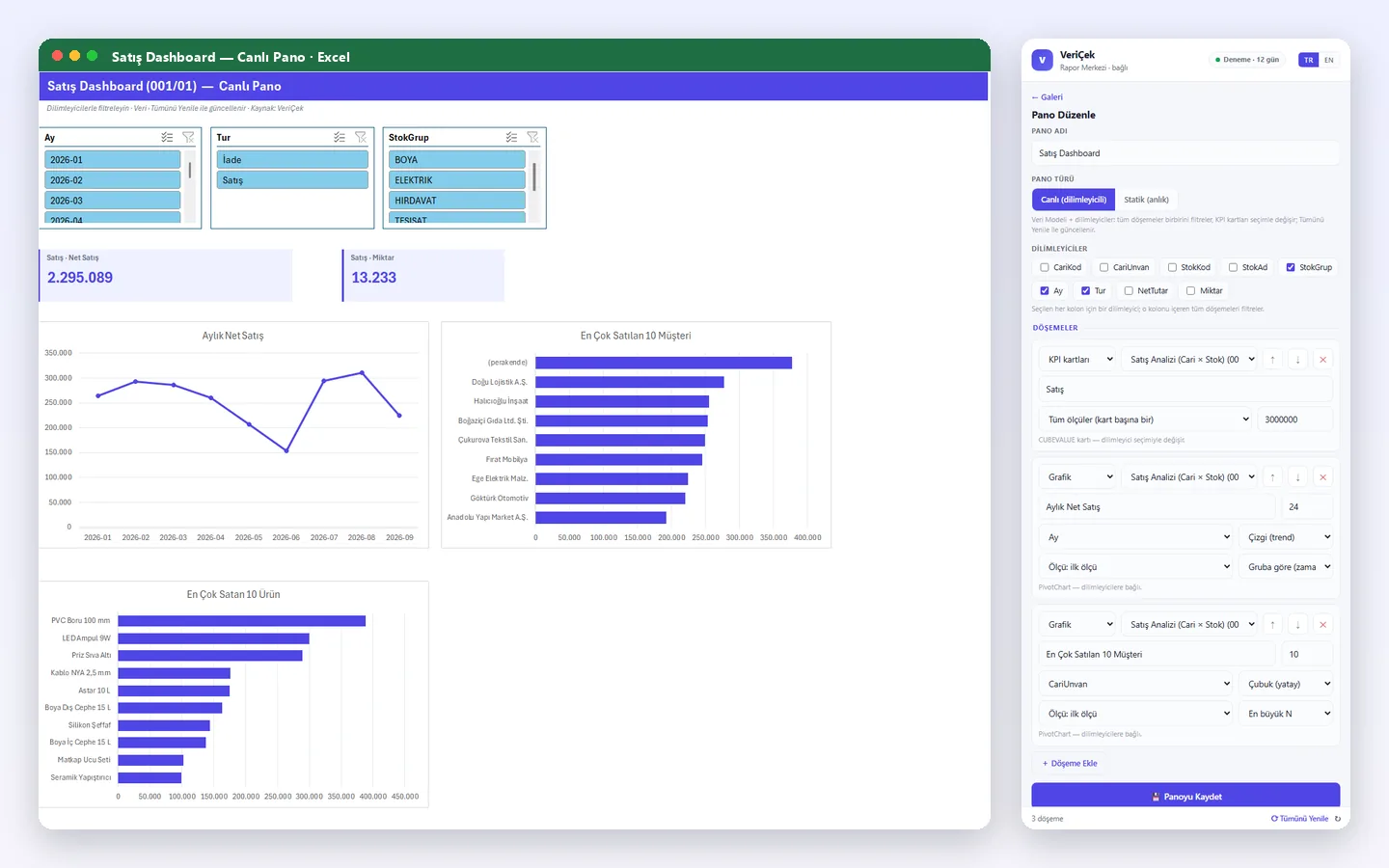
Live sales dashboard: slicers, KPI cards, charts and the dashboard editor (fictitious sample data)
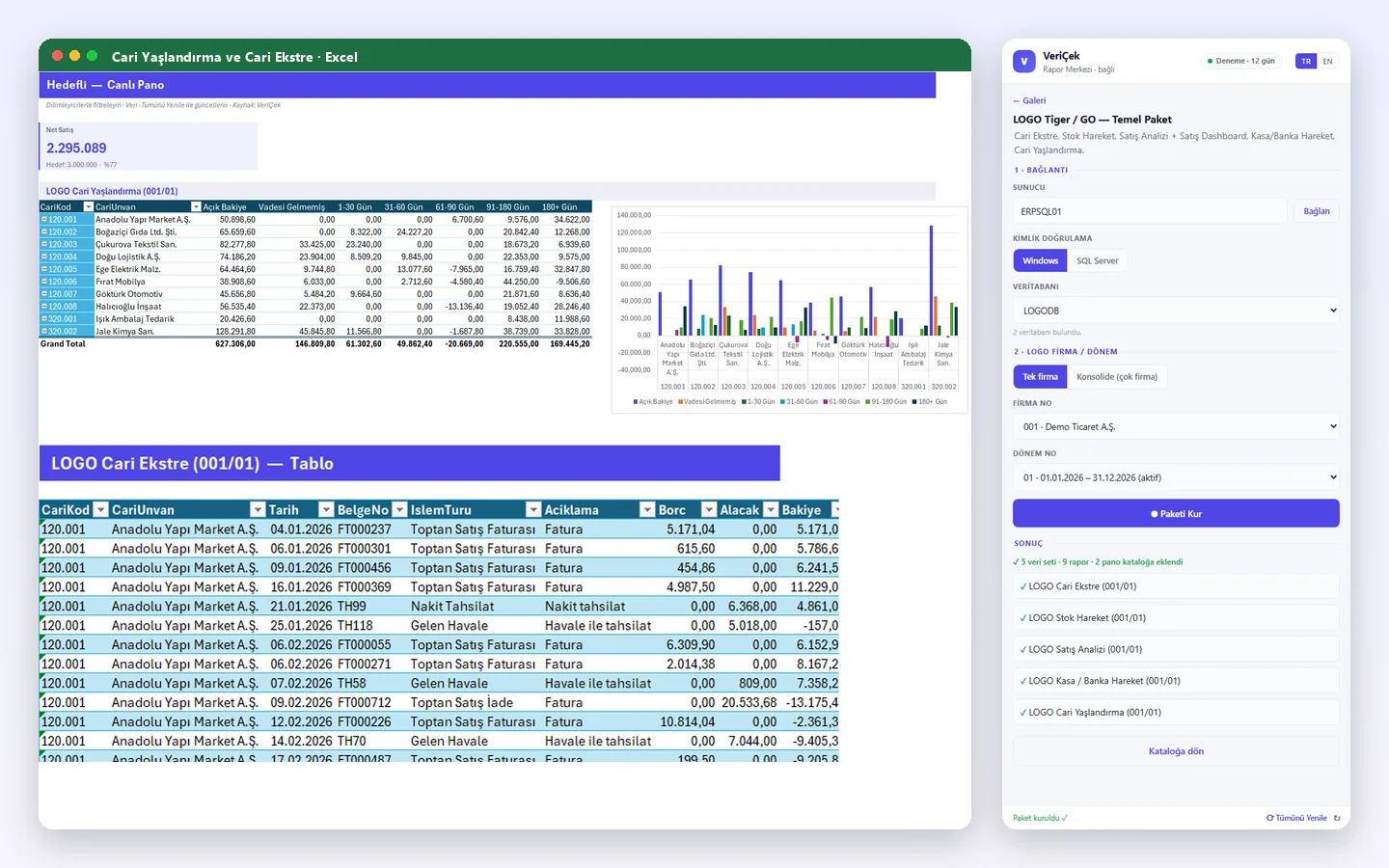
Logo package setup: company and period selection, receivables ageing and account statement (fictitious sample data)
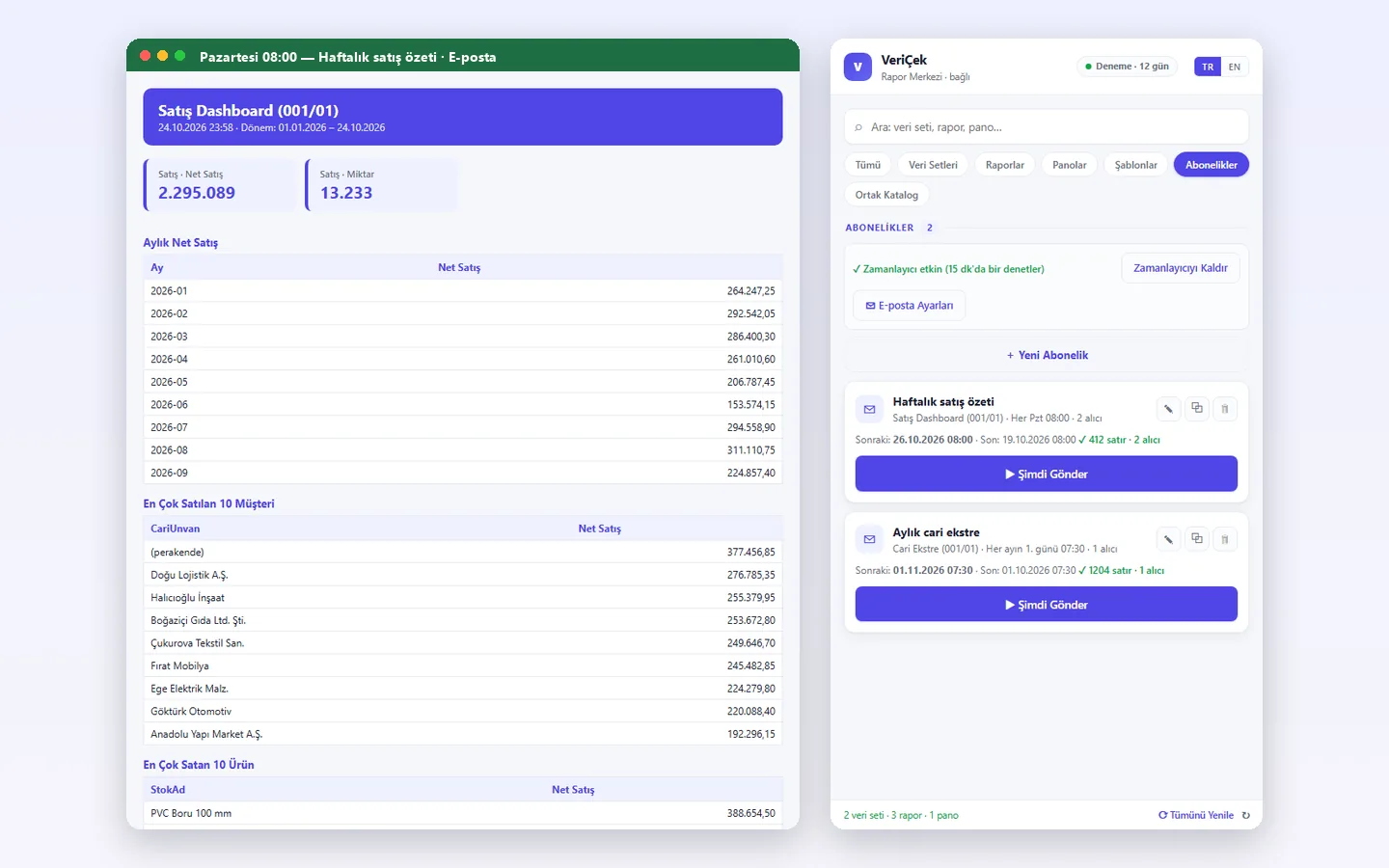
Scheduled e-mail: the sales summary arriving every Monday and the subscriptions (fictitious sample data)

Frequently asked questions

Does it write anything to the Logo database?
No. VeriÇek only reads from the Logo database and its queries are parameterised. The connection uses Windows or SQL authentication and the password is stored encrypted by Windows.
Which Excel and Logo versions does it work with?
It needs 64-bit Microsoft Excel 2016 or later, or Microsoft 365, on Windows. The ready-made packages are for Logo Tiger / GO on SQL Server; companies and periods are detected automatically. There is no ready-made package for Netsis or Mikro yet, but you can connect to any SQL Server database with your own data set.
How is it installed, can I try it?
Download the package from this page and run Kur.cmd with Excel closed; no administrator rights are needed. When you open Excel the VeriÇek tab appears and a 15-day trial starts automatically, with no key to enter.
How does licensing work?
It is licensed per user, per year: the number of seats is the number of people using VeriÇek at the same time. Without a licence, data set and report design and previews stay available. Computers without internet access get an offline licence file.
What does it cost?
The product is in early access; request a quote with the form below.

Keep me informed

ERP VeriÇek is not released yet. Shall we email you when it launches, or give you a call? Choose your channel.

How would you like to be informed? (one or both)

Apply for early access

The product is in pilot. Apply and we will share the early-access terms and pricing with you directly.

Ideas and suggestions

Would you like a feature in ERP VeriÇek, have a suggestion or hit a problem? Tell us; the team reads every message and shapes the roadmap accordingly.

Type

Name and email are optional; leave an email if you would like us to get back to you.