Our Products Early access

The right record in Logo — by hand or by robot

WizLog offers wizards that open customer and stock cards to your company standard, robots that run on schedule and bulk invoicing from waybills; every action is previewed, dry-run and can be undone.

Why WizLog — Data-Entry Wizards for Logo?

The problem

A bad card spoils every document after it

  • The same customer is opened twice under different spellings; balance and risk limit get split.
  • Hidden characters in tax IDs and titles pasted from Excel cause trouble in e-invoices and BA/BS reports.
  • Code structure, VAT and barcodes vary from person to person; waybills are invoiced one by one at month end.
Our answer

Your company rules, at the moment of entry

  • Step-by-step wizards: tax-ID checksum, e-invoice registration check, code mask, EAN-13 barcode, current VAT rates.
  • Duplicate and similar-card warnings stop errors before they reach Logo; in Excel bulk entry every row is cleaned by the same rules.
  • Robots turn Excel files dropped into a folder into cards, scan card quality overnight and invoice waybills at month end.

What sets us apart

Automation that knows Logo and can be undone

  • Deep Logo integration: cities, tax offices, unit sets, sales reps and payment plans are read from Logo; records are written through Logo's own objects and verified afterwards.
  • Every action can be undone: preview, dry-run, run log and one-click undo — for cards and invoices alike.
  • One rule for people and robots: robots use the same wizard definitions and the same writing channel as people; jobs above a threshold go to LogoSurec for approval.

Key features

Customer card wizard

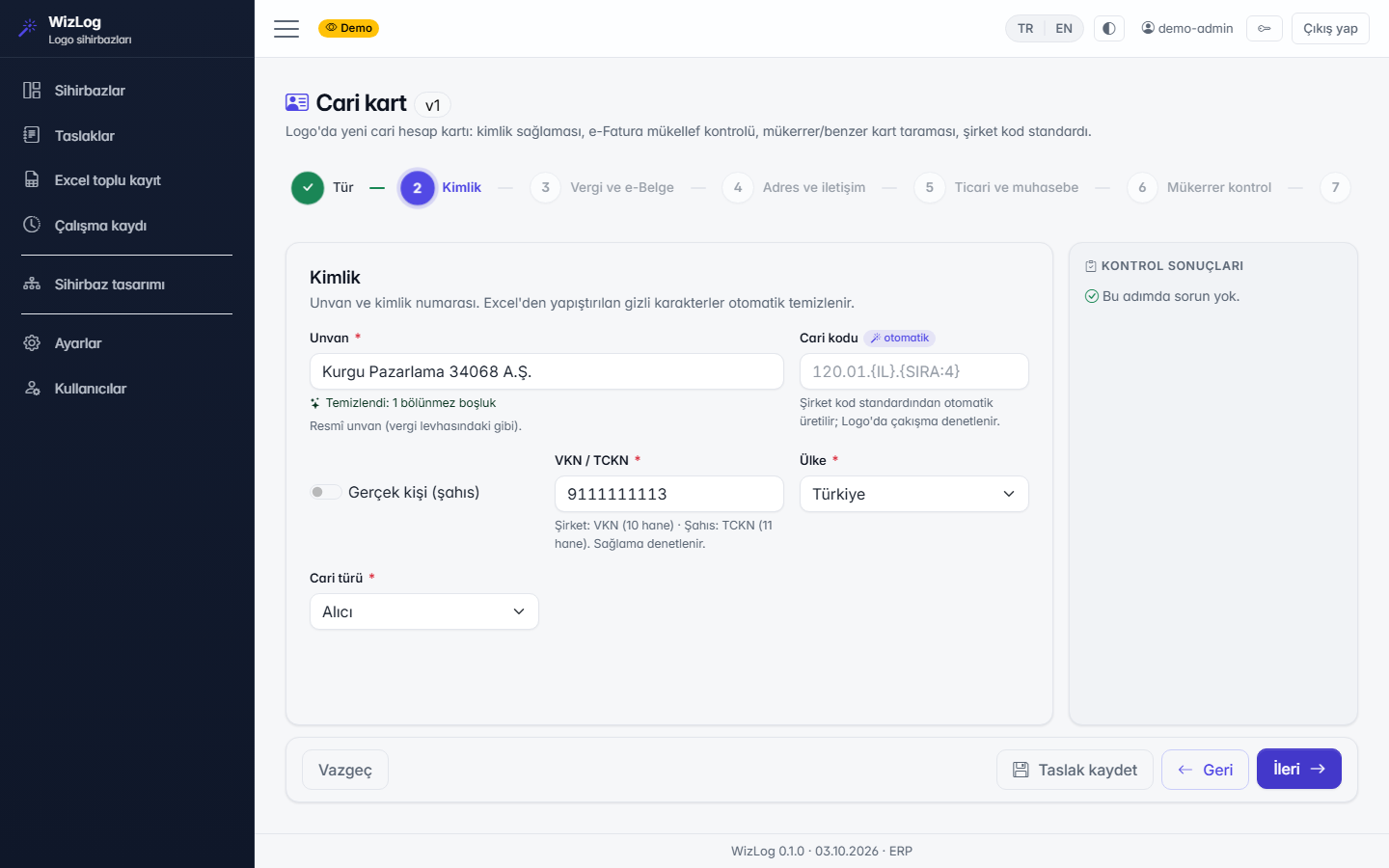
Domestic, foreign, individual and supplier templates; tax-ID checksum, e-invoice registration, foreign tax number, city and tax office from Logo, risk-limit approval.

Stock card wizard

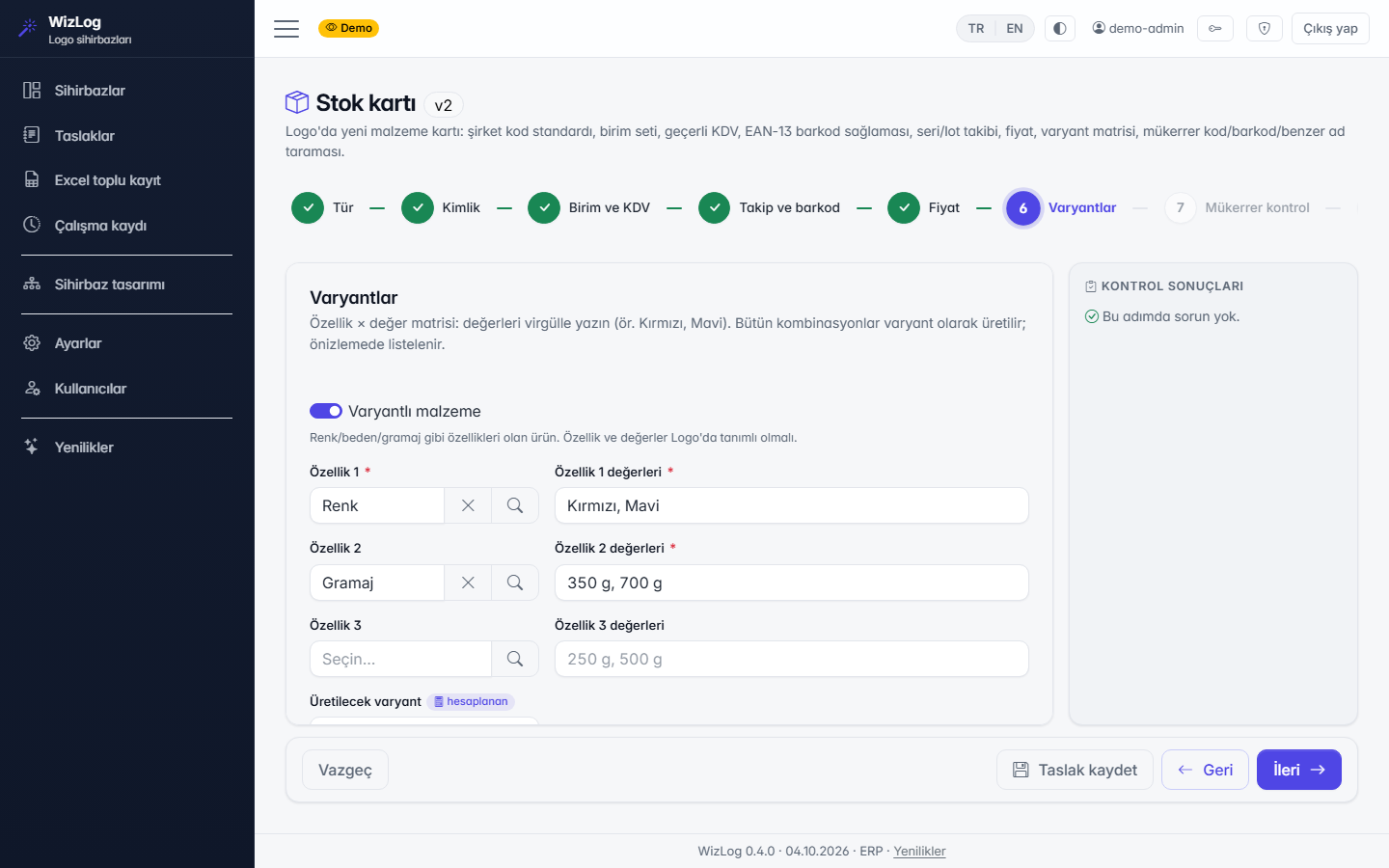
Merchandise, raw material, semi-finished and finished goods; unit sets, current VAT, serial/lot tracking, EAN-13 barcode checksum and variant matrix.

Excel bulk entry

The same definition in bulk: hidden line breaks and non-breaking spaces are cleaned, in-file duplicates flagged and faulty rows returned as an Excel file.

Visual designer

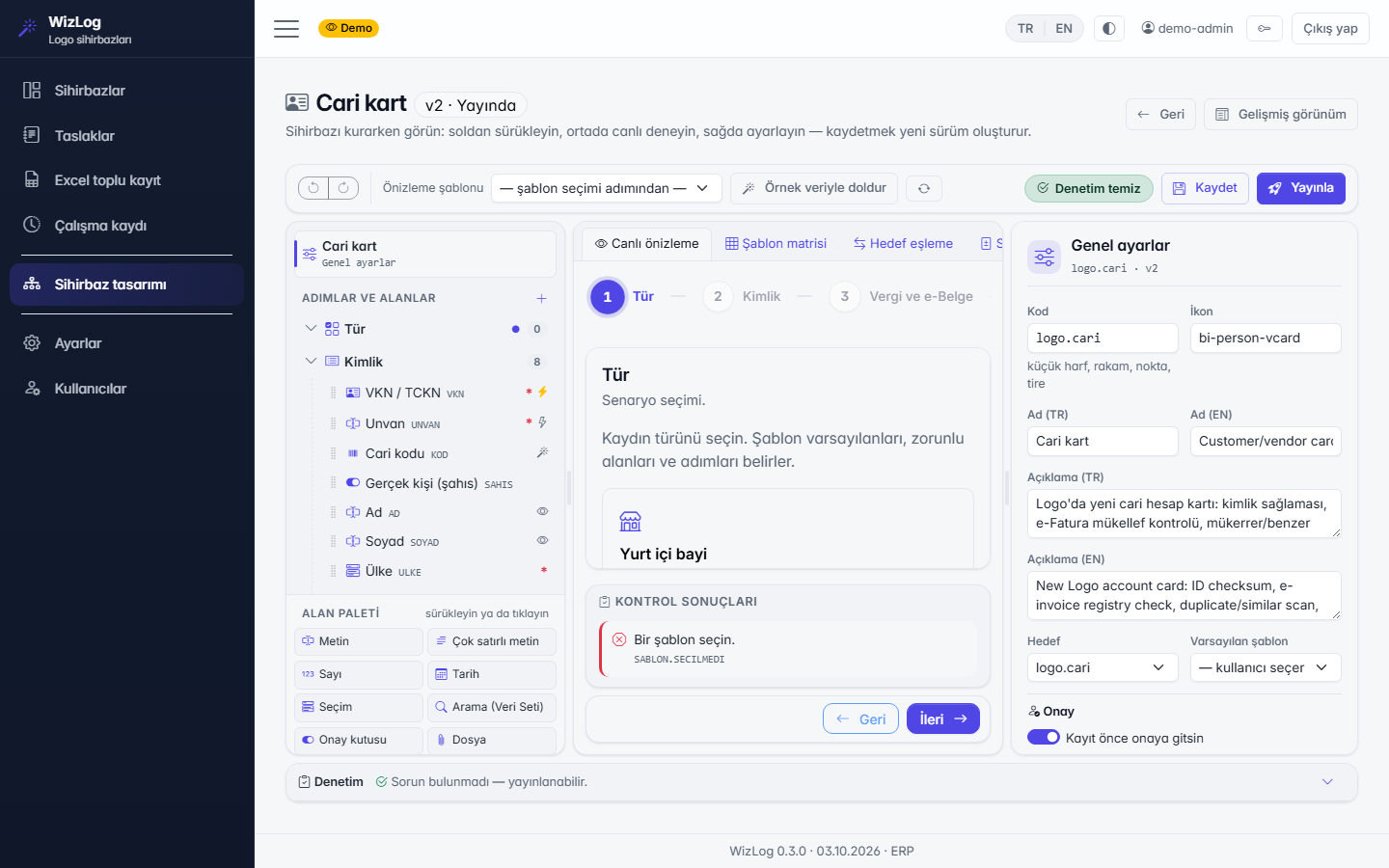
Steps, fields, templates, code masks and conditions without code; live preview, versions and distribution as a .wizlog package.

Robots

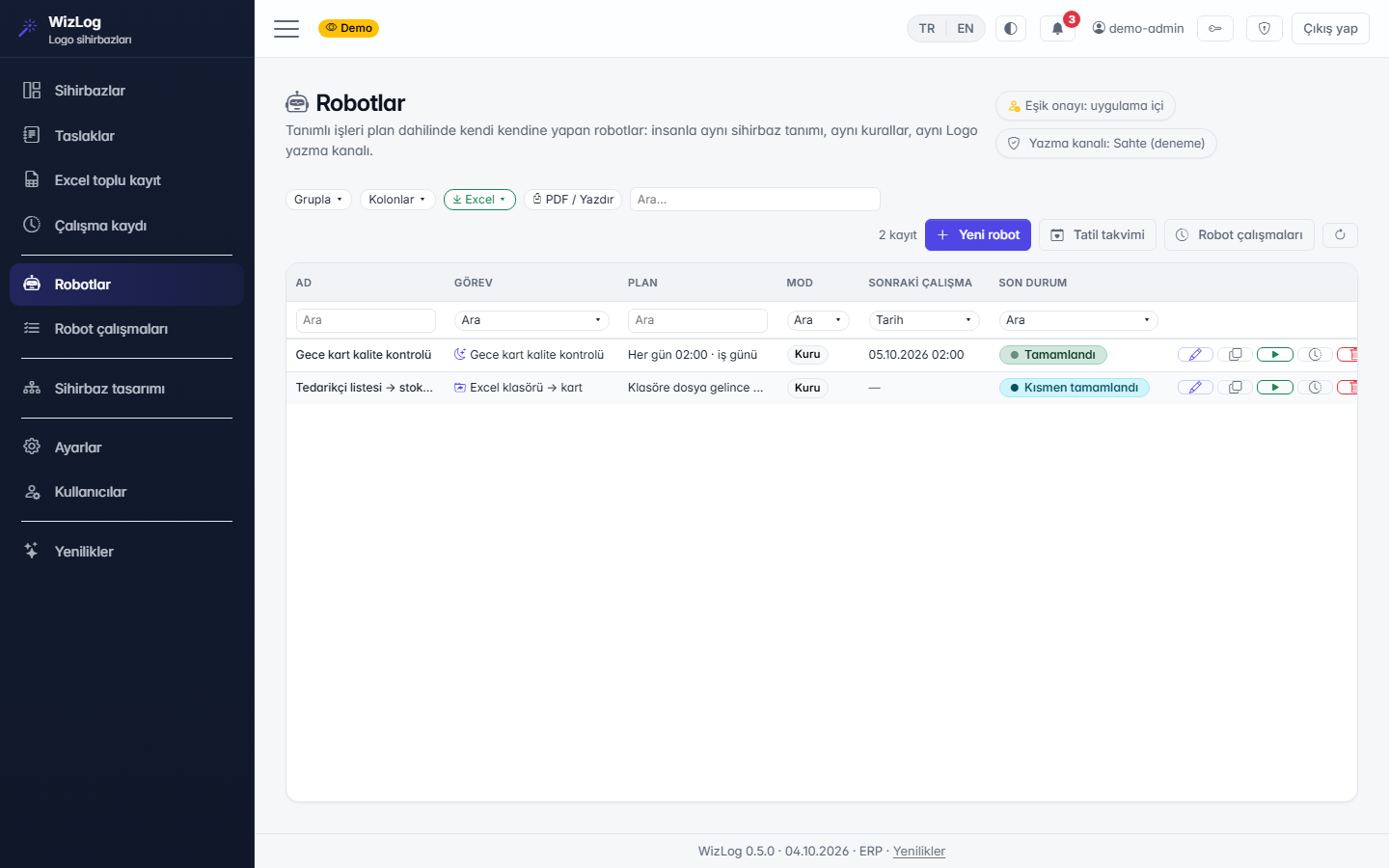
Cards from an Excel folder, overnight card quality checks, month-end bulk invoicing; working-day and holiday calendar, dry-run, count and amount thresholds, LogoSurec approval.

Bulk invoicing from waybills

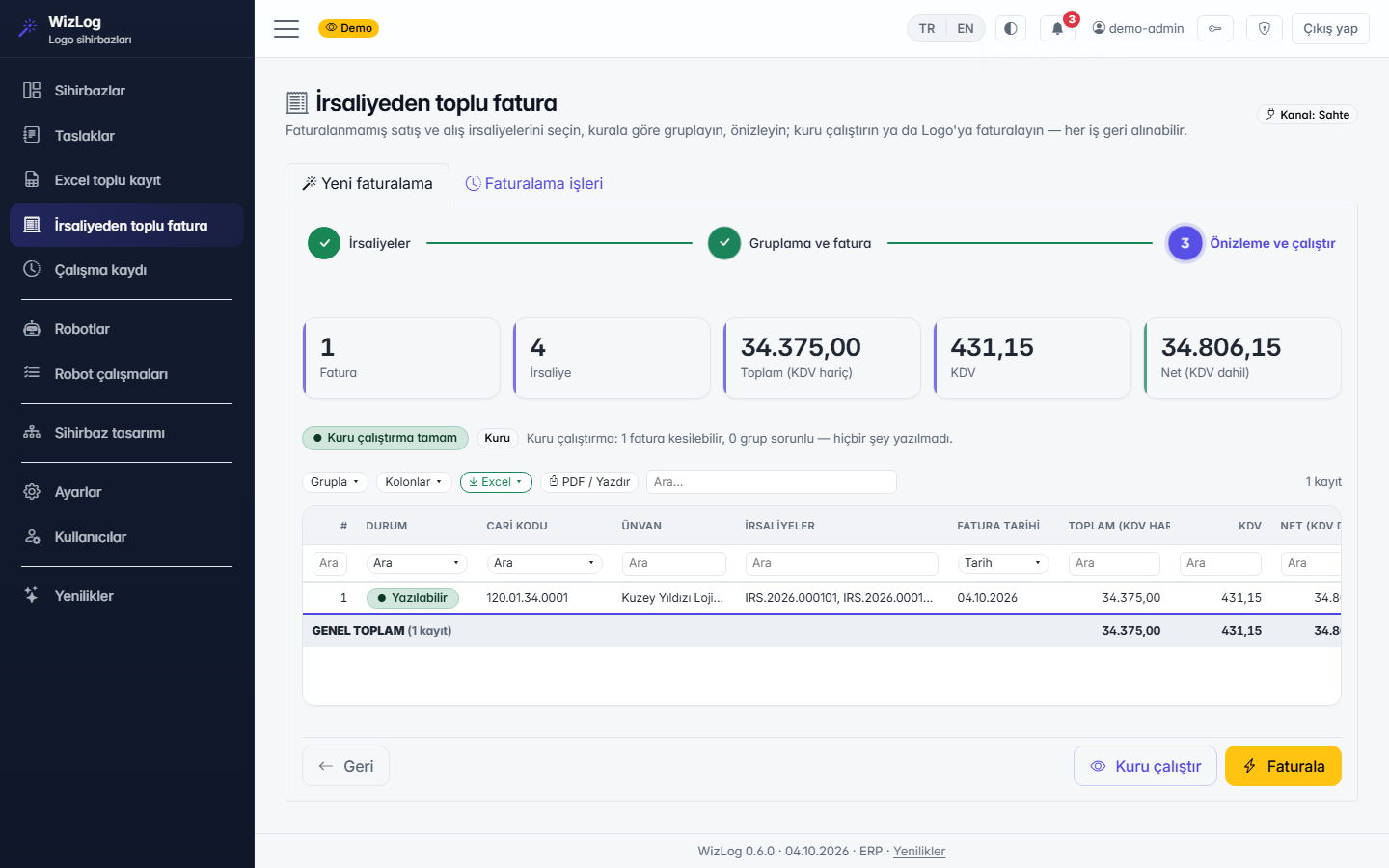
Sales and purchase waybills; grouping per waybill, per customer or per month, seven-day legal deadline warning, duplicate guard, dry-run and undo.

Product details

Intended usersAccounting and finance teams, sales and warehouse staff, ERP dealers
AccessBrowser interface (desktop and mobile browser); on-premises Windows service
Setup / usageSetup wizard, Logo connection
CompatibilityLogo Tiger (verified on the TIGER3 schema); GO being verified; SQL Server
Licence scopeIn beta: ready-made wizards and robots can be tried with the demo account; packages are shared during early access

Screenshots

Customer card wizard: identity step and check results
Stock card wizard: variant matrix
Visual designer: structure tree, live preview, properties
Robots: schedule, dry-run and last status
Bulk invoicing from waybills: preview and dry-run

Today vs. with WizLog — Data-Entry Wizards for Logo

New customer account

Today (manual / spreadsheets)The same customer is opened twice under different spellings; tax ID and title errors show up in e-invoicing.

With WizLog — Data-Entry Wizards for LogoThe wizard checks the tax ID and e-invoice status, and warns about similar accounts before saving.

Bulk cards from Excel

Today (manual / spreadsheets)Hidden characters and duplicates in pasted rows are cleaned up one by one later.

With WizLog — Data-Entry Wizards for LogoEvery row is cleaned with the same rules, in-file duplicates are flagged and failed rows come back as Excel.

Invoicing from dispatch notes

Today (manual / spreadsheets)Dispatch notes are invoiced one at a time at month end.

With WizLog — Data-Entry Wizards for LogoDispatch notes are grouped by note, customer or month and invoiced in bulk; dry run first, undo if needed.

Packages and pricing

Trial

Free

  • All wizards, preview and dry run
  • No writing to Logo, no time limit

Cards

TRY 990 / month / company

  • Customer and item card wizards
  • Excel bulk entry, writing to Logo and undo

Documents

TRY 1,490 / month / company

  • Bulk invoicing from delivery notes (sales and purchase)
  • Seven-day rule warning, dry run, undo

Cards + Documents

TRY 1,990 / month / company

  • Both packages together
  • About 20% less than buying separately

WizLog Complete

TRY 2,990 / month / company

  • Cards + Documents
  • Month-end close and debt closing

Robots (add-on)

TRY 790 / month / company

  • First 3 robot jobs; each further job TRY 190 / month
  • Schedule, dry run, threshold approval

Prices exclude VAT. Paying annually in advance: 12 months for the price of 10. Early access: the first 3 founding customers get 50% off for 12 months. Ask for a quote for installation, training and enterprise terms.

Frequently asked questions

When does it write to Logo?
The default writing channel is a sandbox that does not touch Logo. Real writing is enabled only for the companies you allow; every record is previewed first, verified after writing and can be undone from the run log.
Do robots run unchecked?
No. Robots dry-run by default and have count and amount limits; jobs above the threshold go for approval. A robot writes with the rights of the Logo user you choose, and every run can be undone.
Can we set up our own card standard?
Yes. In the designer you change steps, fields, templates, code masks and conditions without code; the same definition is used for single entry, Excel bulk entry and robots.
What does it cost?
Packages depend on the wizard, robot and document modules. During early access we prepare a quote for your needs; apply with the form at the bottom of this page.

See it for yourself

Try the whole flow with a demo account on a fictional company's data; nothing is written to your real systems. Then we will prepare a quote for your needs.

Keep me informed

WizLog — Data-Entry Wizards for Logo is not released yet. Shall we email you when it launches, or give you a call? Choose your channel.

How would you like to be informed? (one or both)

Apply for early access

The product is in pilot. Apply and we will share the early-access terms and pricing with you directly.

Ideas and suggestions

Would you like a feature in WizLog — Data-Entry Wizards for Logo, have a suggestion or hit a problem? Tell us; the team reads every message and shapes the roadmap accordingly.

Type

Name and email are optional; leave an email if you would like us to get back to you.