
Logo TCMB Kur
A Windows service that writes TCMB rates into Logo ERP and registers itself with the licensing center.
Key features
Flexible scheduling
Pulls rates daily at a set time (default 06:00) or on a fixed interval, and processes the target day immediately when the service starts.
Bulletin rule and lookback
The TCMB 15:30 bulletin applies to the next day; on weekends and public holidays it searches back up to a configurable number of days.
Safe writes and rollback
Runs in insert-only or update-existing mode; every run's Logo writes are snapshotted and can be rolled back with one click, while rows edited by hand afterwards are skipped.
Rate column mapping
All currency codes in the bulletin are supported; which TCMB rate (forex or cash, buying or selling) writes to which Logo RATES column is chosen in the setup wizard.
E-mail notifications
Downloaded rates are e-mailed as an HTML table with an optional Excel or CSV attachment; any archived bulletin can also be sent by hand.
Verification report
At a scheduled time it checks whether the target day's rates were entered into Logo for every selected company, and e-mails any gaps by company and code.
Download
Download Download the setup wizard (.exe)
Permanent link to this version:
https://tcmbkur.erp.tr/dl/logo-tcmb-kur/1.6.6
Installation
- Extract the downloaded zip file into a folder.
- Right-click install.ps1 in that folder and choose “Run with PowerShell”; Windows will ask for administrator approval (UAC).
- When setup finishes, complete the wizard at http://127.0.0.1:<port>/kurulum, which opens in your browser.
The package is not digitally signed, so Windows SmartScreen may warn you: “More info” → “Run anyway”.
SHA-256f4750583b0dcce5455cfb03c5309a0c1dfa574fe71baffa7b024b64ba5358dcf
After downloading, verify the file is intact:
Get-FileHash .\TcmbKur-Logo-1.6.6-win-x64.zip -Algorithm SHA256
Screenshots
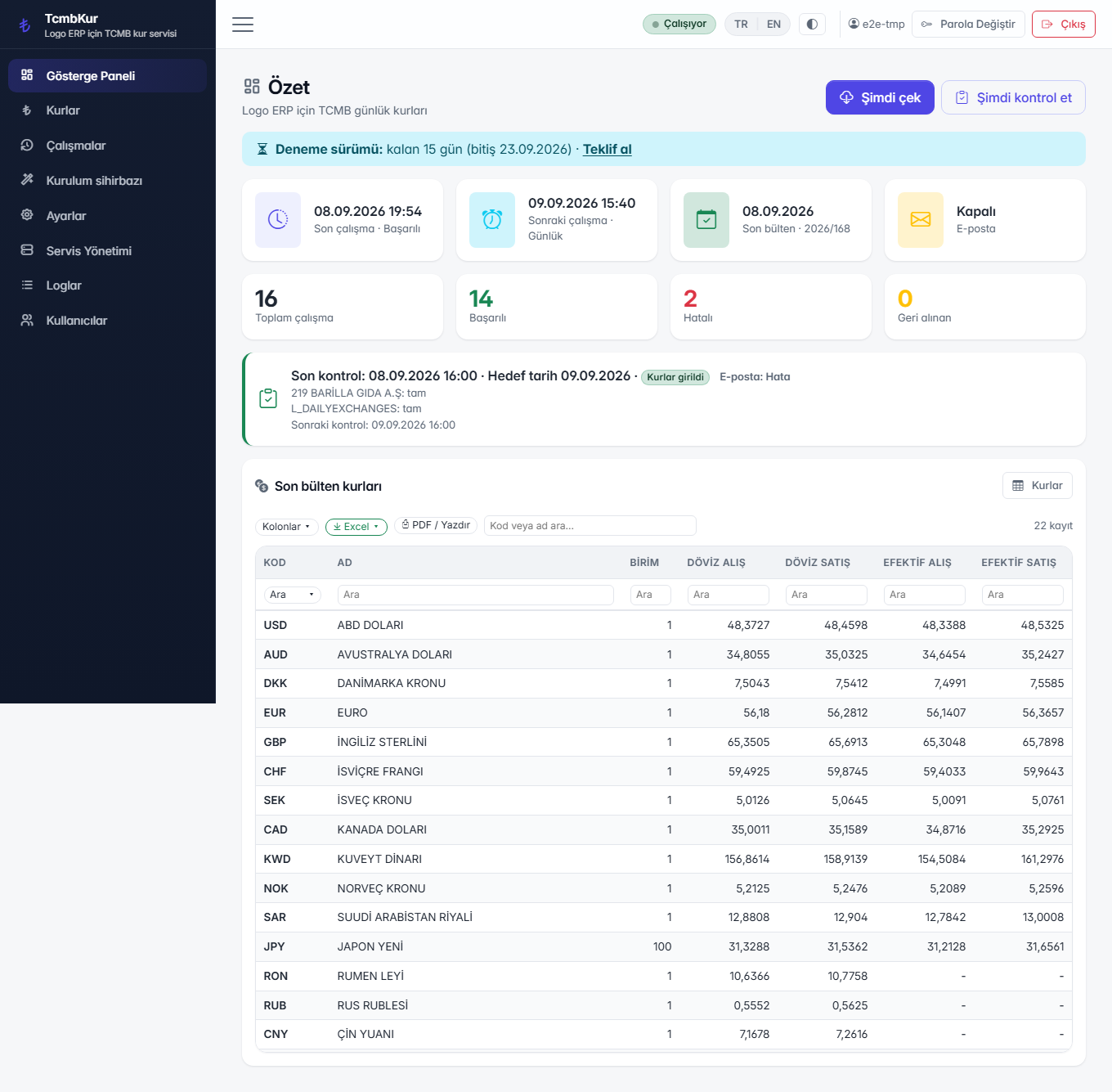
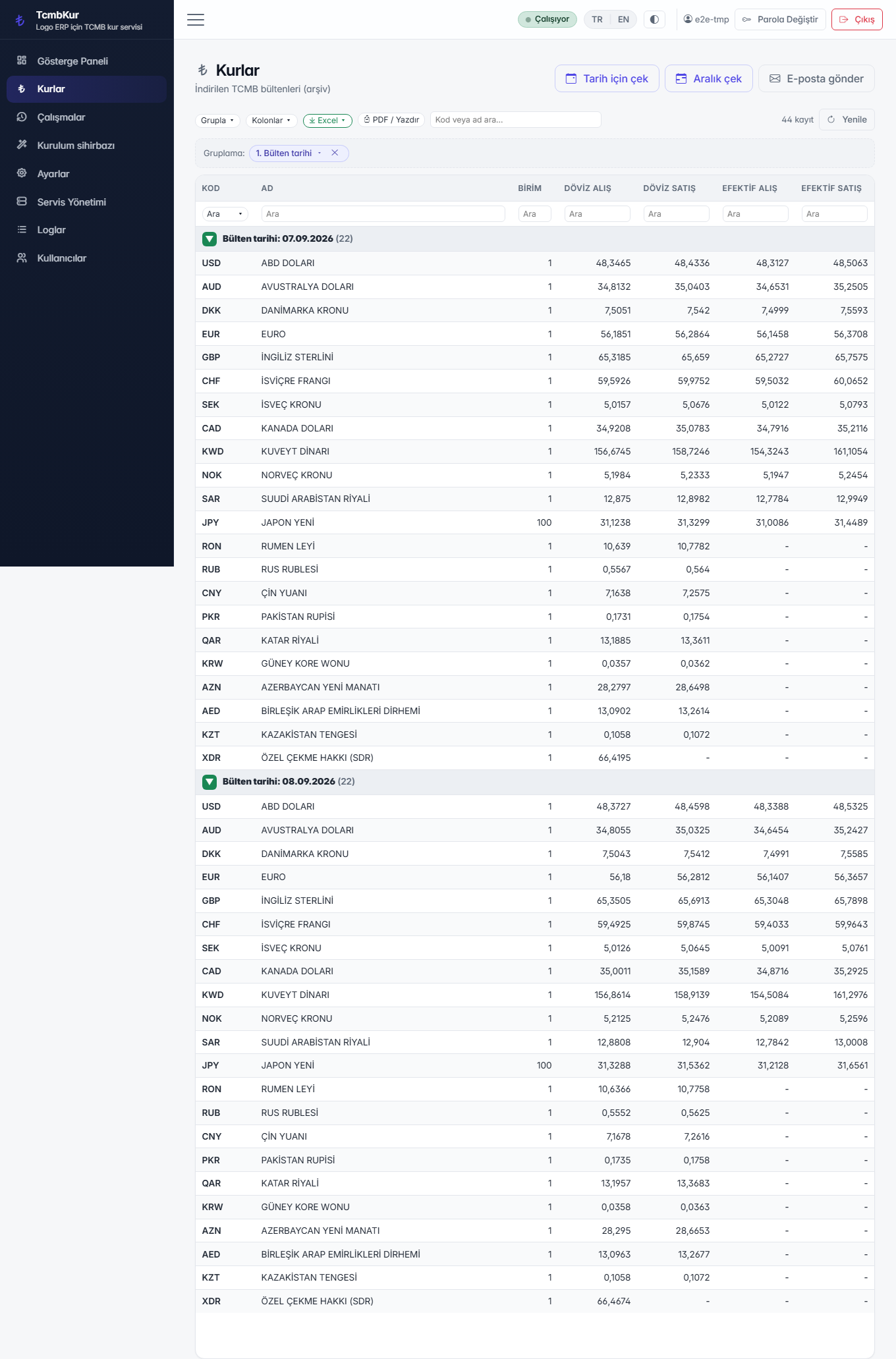
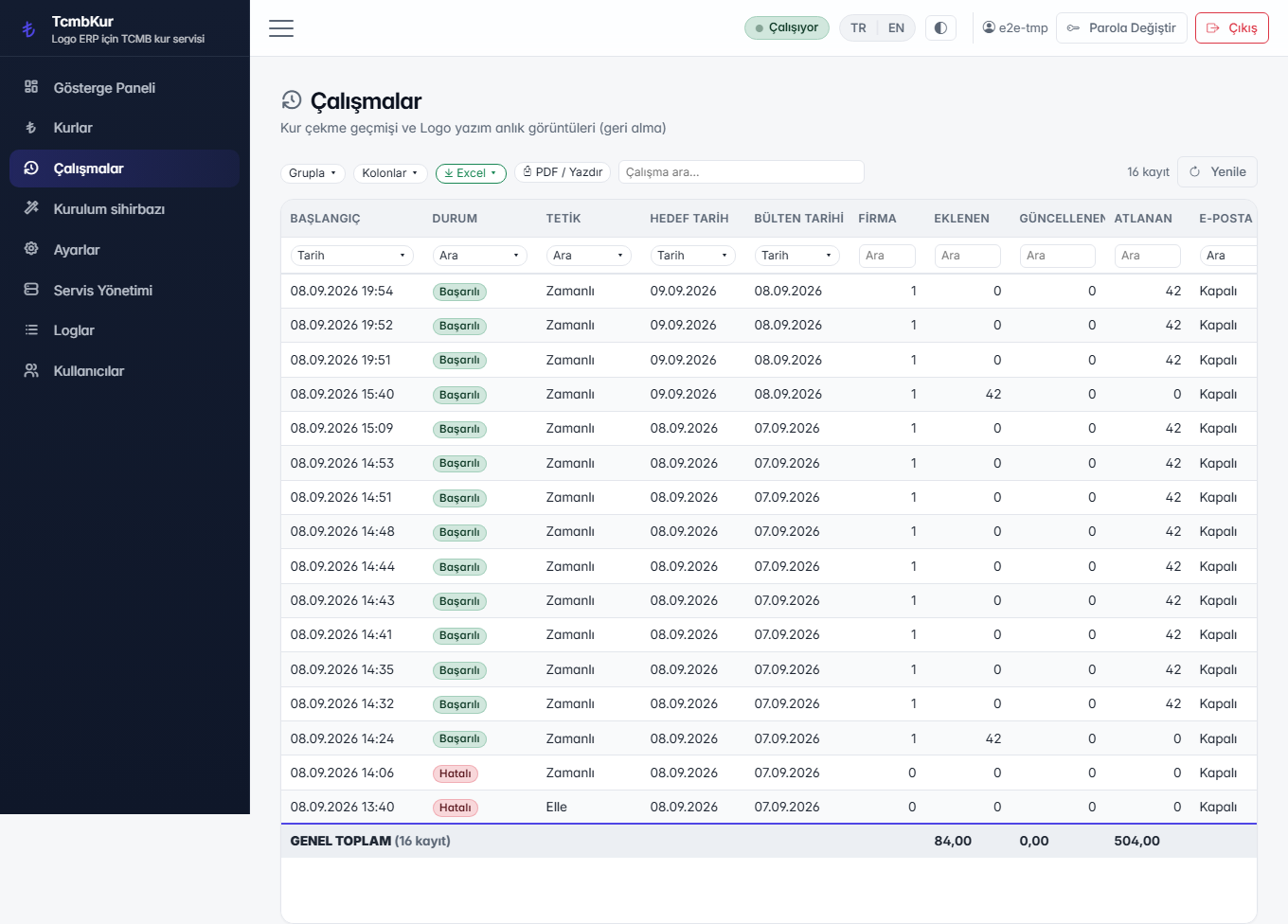
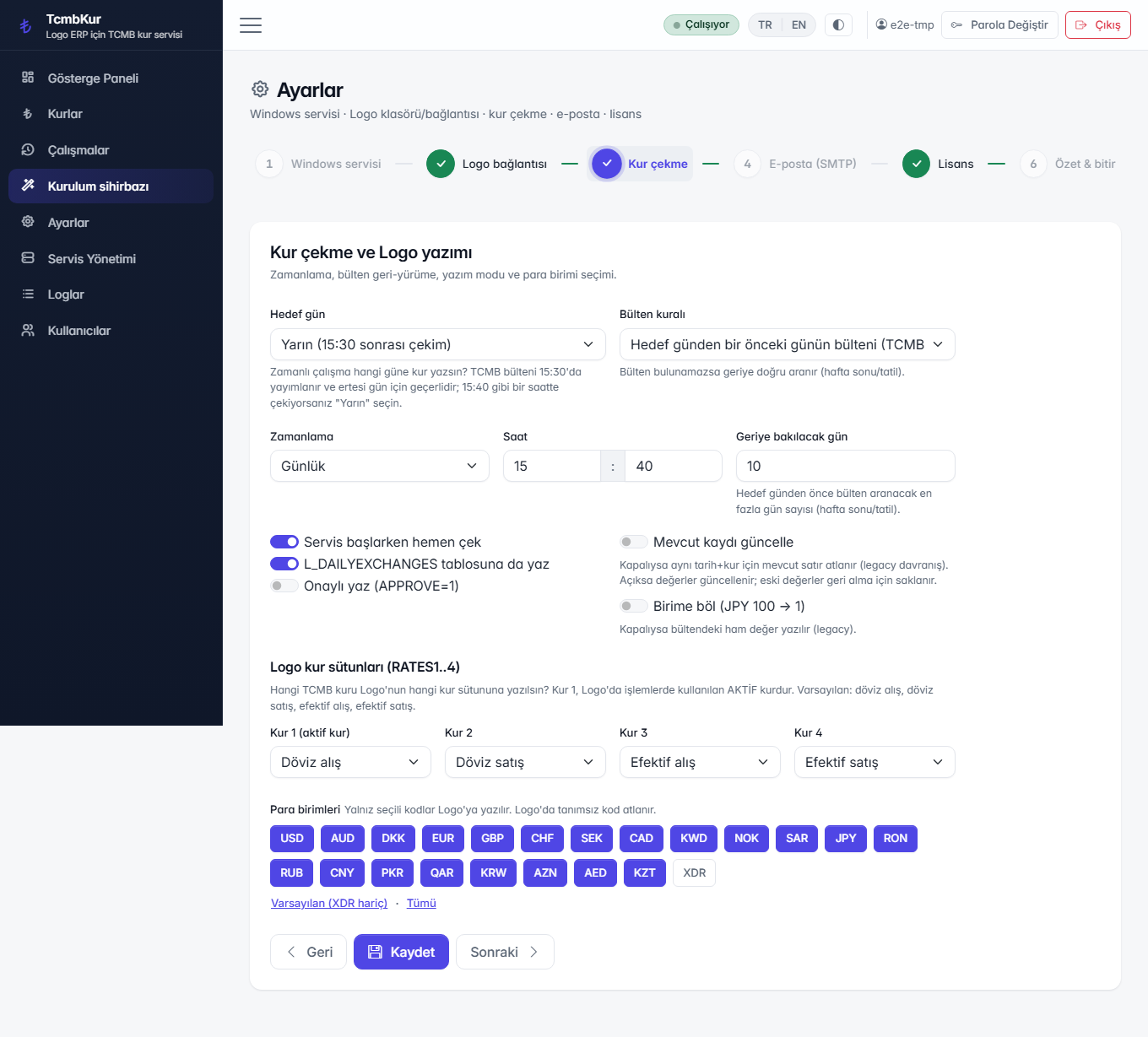
Today vs. with Logo TCMB Kur
Daily rate entry
Today (manual / spreadsheets)Every morning rates are copied from the central bank site and keyed into Logo by hand.
With Logo TCMB KurRates are fetched on a schedule and written observing the 15:30 rule and holidays.
Wrong entries
Today (manual / spreadsheets)A wrong rate flows into vouchers until someone notices.
With Logo TCMB KurWrites are done safely and can be undone with one click.
Keeping people informed
Today (manual / spreadsheets)Rates are shared with the team in a separate e-mail.
With Logo TCMB KurAn e-mail with Excel/CSV and a control report goes out automatically.
How does pricing work?
Pricing depends on the modules you use and on the number of users and companies. Try it free first or ask for a short live demo; once the scope is clear, we send a written quote.
- We are with you during installation and initial setup.
- No credit card or payment details needed for the trial.
- The quote states the scope, number of users and support period clearly.
Install in 3 steps
-
1. Install the package
install.ps1 (elevates via UAC)
The install.ps1 script inside the zip picks a free port, creates the TcmbKur database, installs and starts the Windows service, and opens the setup wizard. On first run, the app automatically registers the installation with the licensing center.
-
2. Configure the Logo connection
Wizard: SQL connection, companies, rate columns
Connect to the Logo SQL server and verify it with Test Connection, choose the companies to write rates to, and set which TCMB rate maps to which RATES column.
-
3. Run the first pull
Summary step → Run first pull
On the wizard's Summary step, Run first pull fetches the target day's rates immediately; from then on the service runs automatically at the scheduled time.
Frequently asked questions
Why does today's rate come from yesterday's bulletin?
The TCMB 15:30 bulletin applies to the next business day, so the target day uses the previous day's bulletin. On weekends and holidays it searches back to the last business day.
Why wasn't a currency code written to Logo?
The code must be defined in Logo's L_CURRENCYLIST table; undefined codes are skipped, and the run detail shows how many were skipped.
I pulled the same day twice and nothing changed — is that expected?
Yes. The default write mode is insert-only, so an existing row is skipped. Turning on Update existing record in settings updates the values instead, and the change can be rolled back if needed.
E-mail notifications aren't arriving — what should I check?
Send a test e-mail from Settings → E-mail, check the e-mail error on the run detail, and review the application logs (/logs).
Do I need to enter a license key or API key?
No. On first run, setup registers the machine with the licensing center as Pending. ERP assigns the agreed license to that installation centrally; the short code/QR shown in setup is only for finding the correct record.
Does the decimal separator (comma/dot) cause problems?
No. TCMB values are parsed culture-independently (dot decimal) and written to SQL Server as typed parameters, so no corruption occurs even on a tr-TR machine.
Works well with
LOGO Power Bundle
A decision cockpit on your LOGO ERP data, no-code approval workflows and automatic Central Bank (TCMB) exchange rates.
All solution bundlesKeep me informed
Choose how you would like to hear about Logo TCMB Kur: news by email, or a call from us.
Trial, demo or quote
Ideas and suggestions
Would you like a feature in Logo TCMB Kur, have a suggestion or hit a problem? Tell us; the team reads every message and shapes the roadmap accordingly.