Our Products

AdrKampus — Campus Management

ERP Kampüs opens the student record together with a Logo account card, applies the fee schedule and discounts at term enrolment, posts the charge right away, sends the invoice to Logo and applies collections to the balance.

Why AdrKampus — Campus Management?

The problem

Student charges in spreadsheets, invoices in Logo, payments at the bank

  • At the start of every term tuition is calculated by hand in spreadsheets; scholarship and discount rates get mixed up from student to student.
  • Student account cards and invoices are keyed into Logo one by one; code and tax errors surface at term end.
  • Bank and card payments are matched to students after the fact; there is no single answer to «what does this student owe?».
Our answer

One flow from enrolment to balance

  • When a term enrolment is opened or changed, the charge is calculated from the fee schedule and discounts and posted automatically; there is no separate accrual step.
  • Student account cards and autumn/spring invoices are transferred to Logo in bulk, with validation.
  • Collections are entered with method and account, and a receipt is printed; the student ledger and balance report are always current.

What sets us apart

Designed for student finance from day one

  • A real fee model: fees resolve by cohort year, department, payment type, validity period and semester; autumn and spring are managed independently.
  • Cascading discounts: scholarships and discounts apply in order, each on what the previous one left; the order can be changed and the net amount never goes negative.
  • Leaves a trail: every change is in the audit log; deletion is soft and records can be restored.

Key features

Enrolment wizards

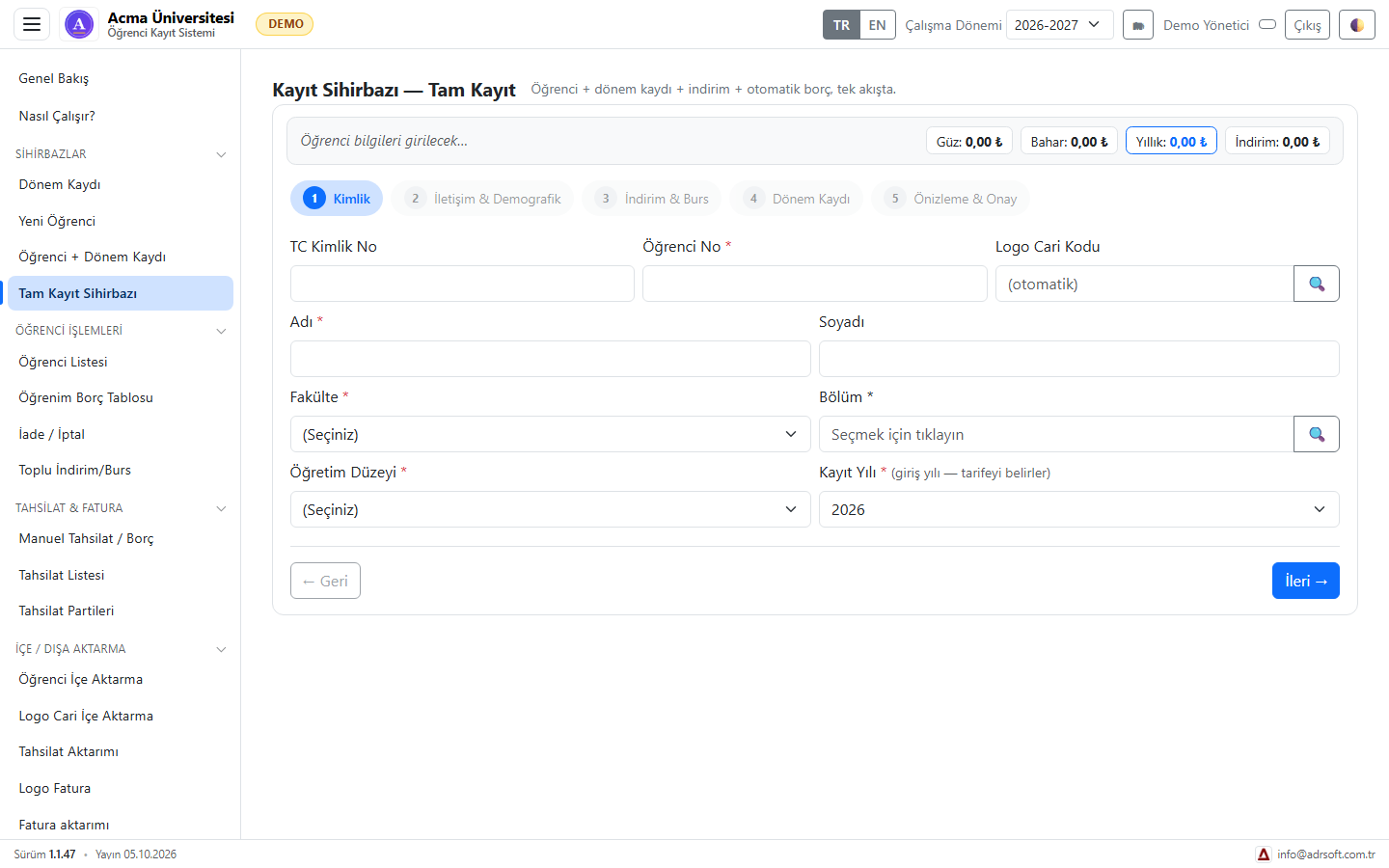
New student, term enrolment or both: identity, contact, discounts and scholarships, term enrolment and preview steps, with live autumn/spring/annual amounts.

Fee schedule tools

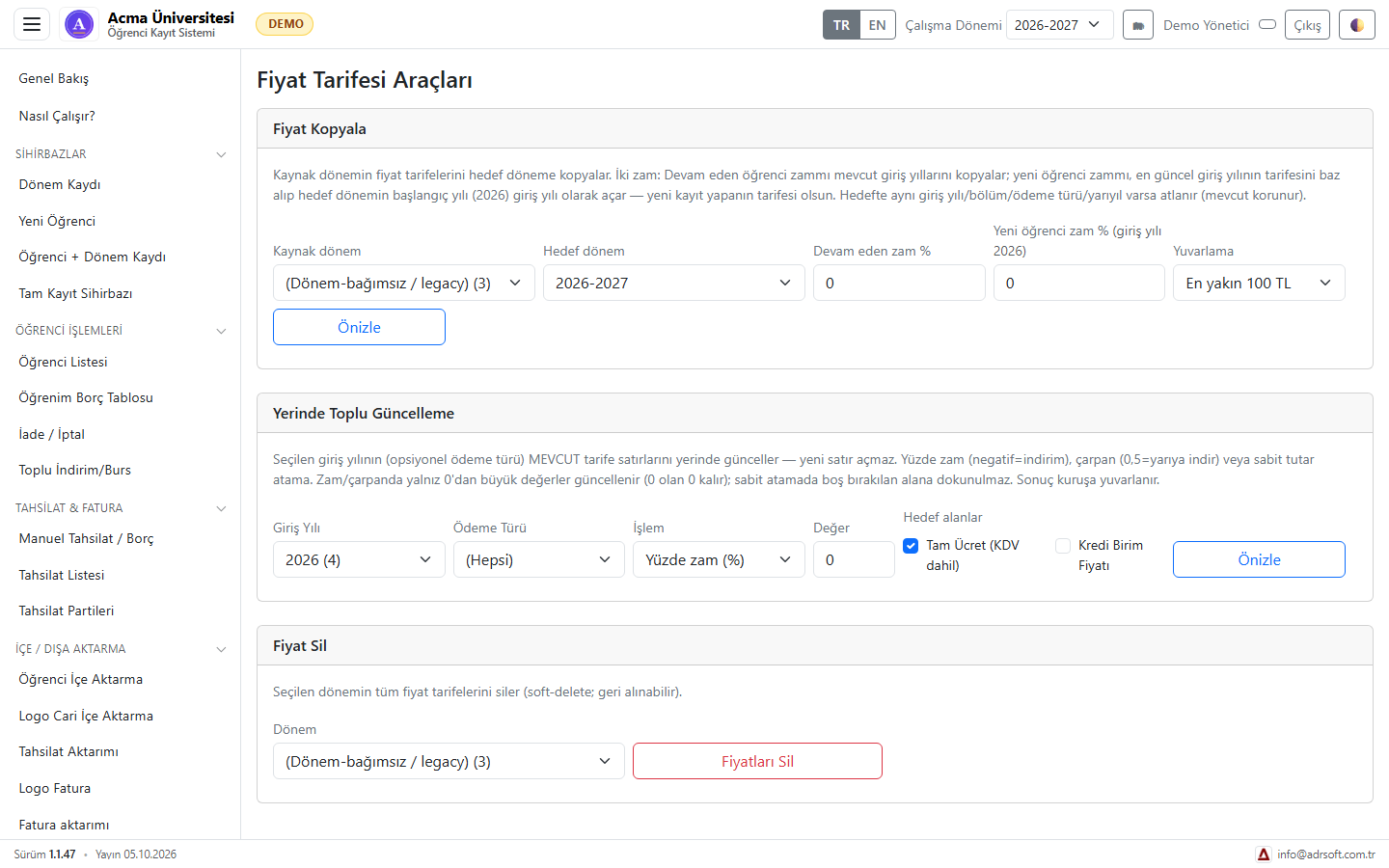
A new term's fee schedule is copied from the previous one, bulk-updated in place by percentage with rounding, and a wrong term is removed in one go.

Discounts and scholarships

Sibling, early-payment and merit discounts apply in cascade; bulk discount/scholarship assignment works from a list of student numbers, with a preview first.

Accounts and invoices to Logo

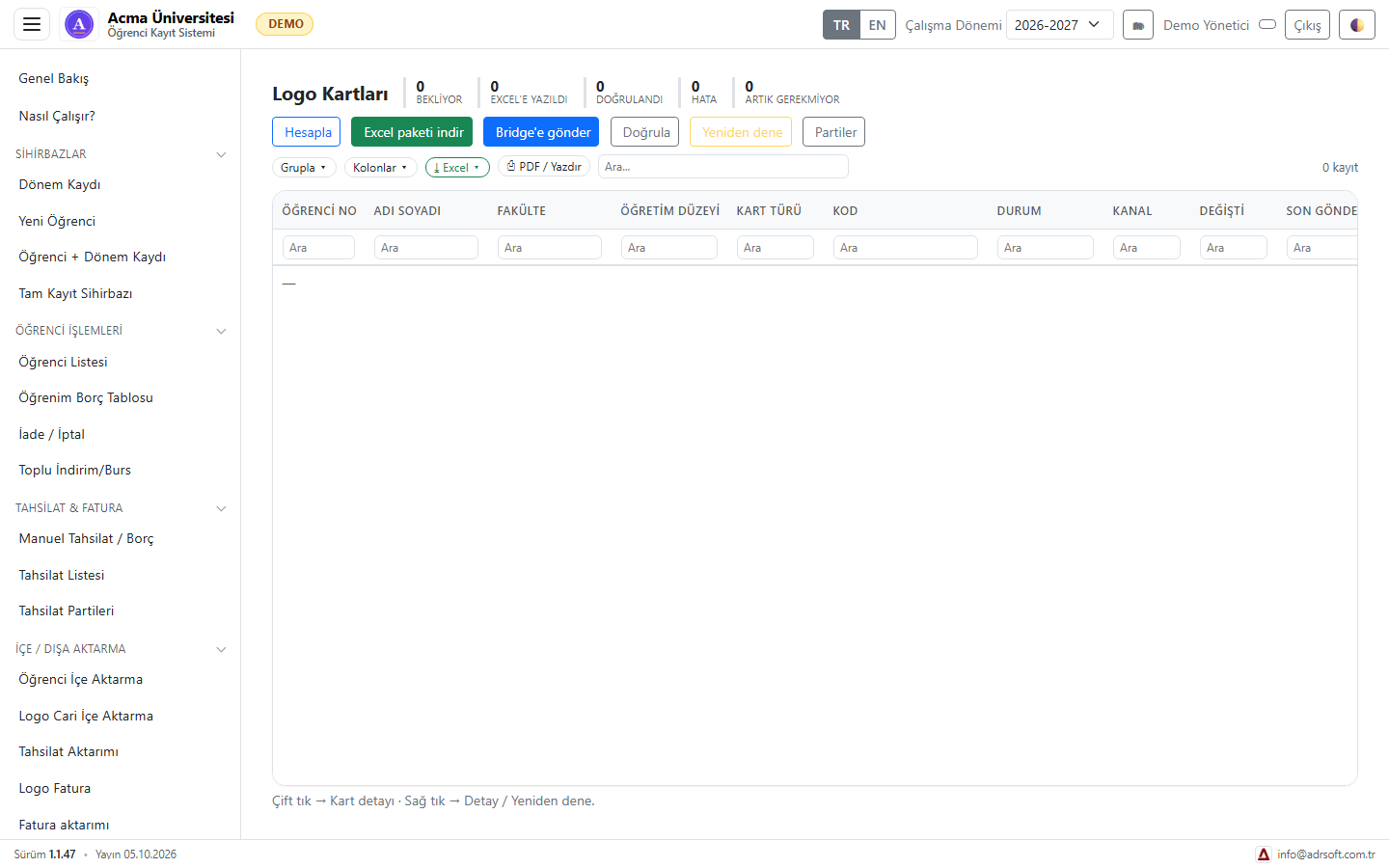
Student account cards and tuition invoices are sent to Logo directly or via Bridge; each card's status, error and retry option on one screen.

Collections and receipts

Collections by bank transfer, card and other methods; sequentially numbered receipts, collection batches and import. Refunds and cancellations on a separate screen.

Ledger and balances

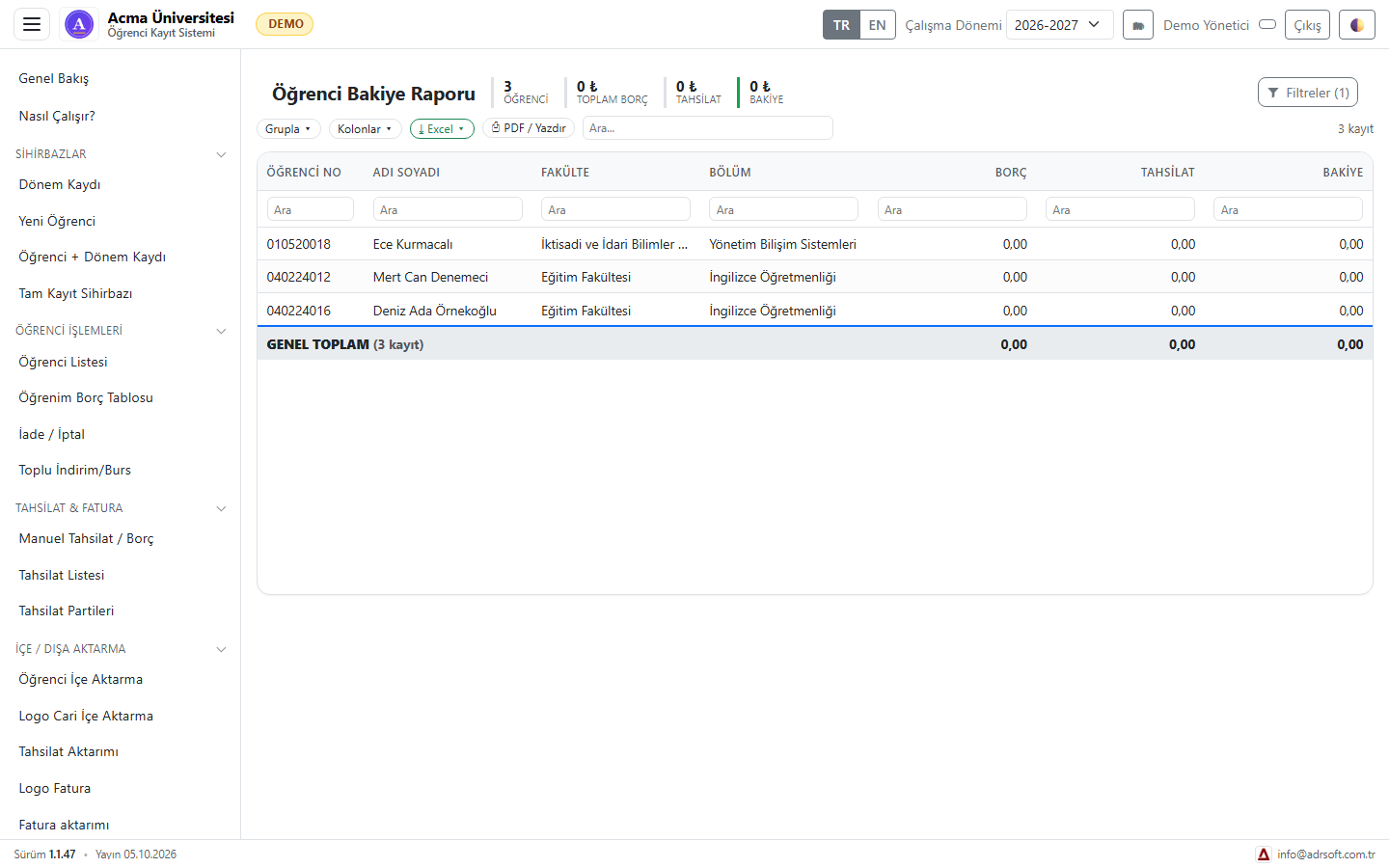
Charges, collections and balance per student; grouping by faculty and department, Excel and PDF export. A built-in guide explains the flow step by step.

Product details

Intended usersStudent affairs, finance and accounting offices at private universities and schools
AccessBrowser interface; Windows service on your institution's server
Setup / usageSetup wizard: database, Logo company/period, administrator; data migration by our team
CompatibilityLogo Tiger (account card and invoice transfer, direct or via Bridge); SQL Server
Licence scopeLicensed per institution; scope and quote on request
Version1.1.47

Screenshots

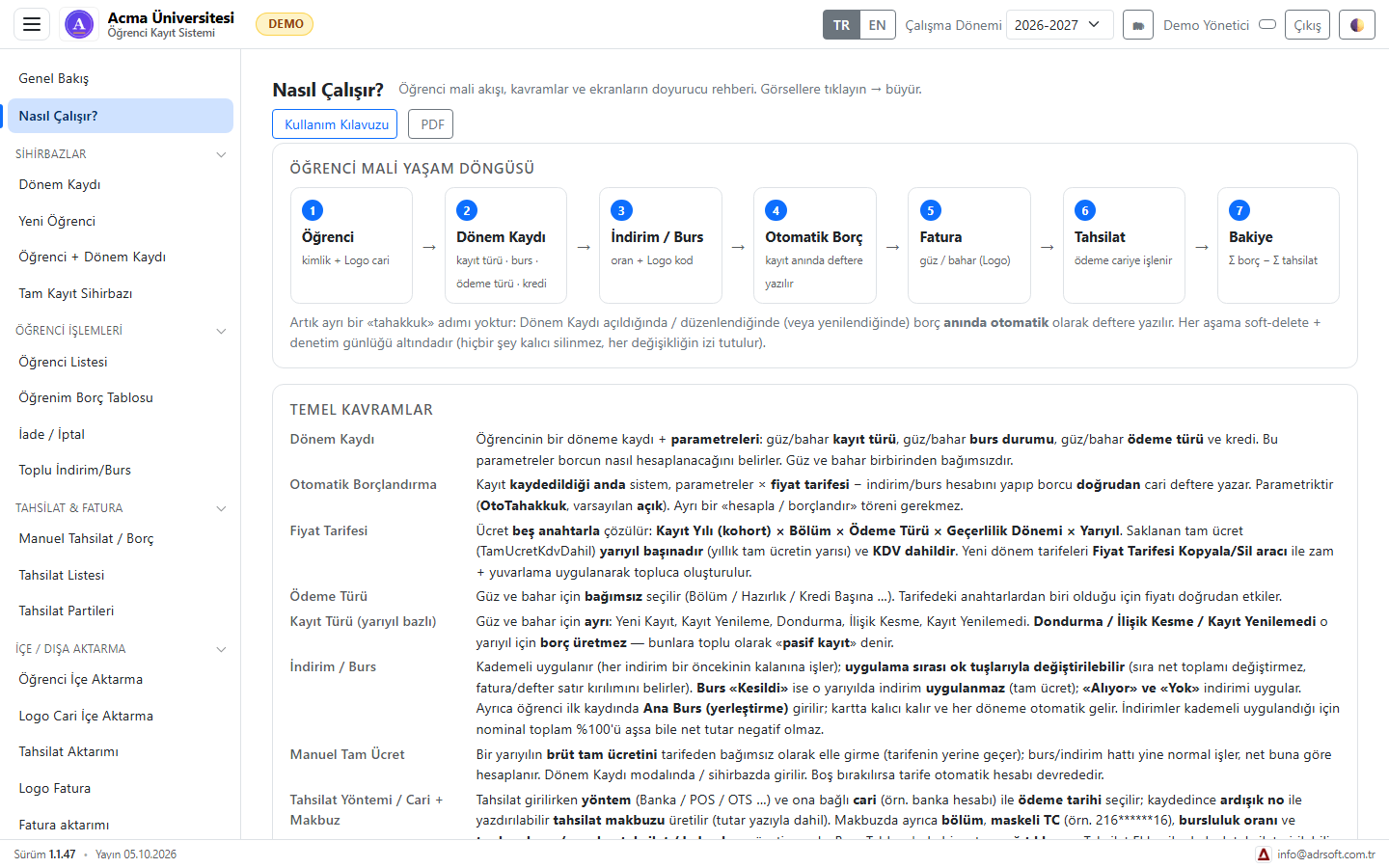
The student financial life cycle and key concepts (fictitious demo data)
Full enrolment wizard with live autumn, spring and annual amounts (fictitious demo data)
Student balance report: charges, collections, balance (fictitious demo data)
Fee schedule tools: copy, bulk update, delete
Logo cards: send via Excel package or Bridge, then verify

Today vs. with AdrKampus — Campus Management

Start-of-term tuition

Today (manual / spreadsheets)Balances are worked out by hand in spreadsheets; scholarship and discount rates get mixed up.

With AdrKampus — Campus ManagementWhen a term registration opens, the balance is calculated from the tariff and stepped discounts and posted automatically.

Accounts and invoices in Logo

Today (manual / spreadsheets)Student accounts and invoices are keyed into Logo one by one; mistakes surface at term end.

With AdrKampus — Campus ManagementAccounts and autumn/spring invoices are sent in bulk with validation; each card's status and error on one screen.

Collections and balance

Today (manual / spreadsheets)Bank and POS collections are matched to students afterwards.

With AdrKampus — Campus ManagementCollections are entered by method with sequentially numbered receipts; debt, payments and balance are shown per student.

How does pricing work?

Pricing depends on the modules you use and on the number of users and companies. Try it free first or ask for a short live demo; once the scope is clear, we send a written quote.

  • We are with you during installation and initial setup.
  • No credit card or payment details needed for the trial.
  • The quote states the scope, number of users and support period clearly.

Frequently asked questions

What does it write to Logo?
Student account cards and autumn/spring tuition invoices; each transfer is validated first, every card's status is tracked and failed ones can be retried. Charges, collections and balances work even without a Logo connection.
How do we bring in our existing student data?
Student lists, Logo account cards and past collections are imported from Excel through import screens; unmatched records are reported during import. Our team runs the first import with you.
Where is our data kept?
On your institution's own server, in your own SQL Server database. The application runs as a Windows service and is used from a browser on your network.
What does it cost?
We prepare a quote based on the size of your institution, the number of students and the migration scope. Try the demo, then apply through the form below.

See it for yourself

Try the whole flow with a demo account on a fictional company's data; nothing is written to your real systems. Then we will prepare a quote for your needs.

Keep me informed

Choose how you would like to hear about AdrKampus — Campus Management: news by email, or a call from us.

How would you like to be informed? (one or both)

Trial, demo or quote

What would you like?

Ideas and suggestions

Would you like a feature in AdrKampus — Campus Management, have a suggestion or hit a problem? Tell us; the team reads every message and shapes the roadmap accordingly.

Type

Name and email are optional; leave an email if you would like us to get back to you.