Our Products Early access

ERP Debt Tracker

Closes open debits and credits in Logo by your rules; preview, approval, reporting and undo on one screen. Download the early-access version and try it.

Why ERP Debt Tracker?

The problem

Unclosed transactions clutter account statements

  • Paid invoices still look open; ageing and due-date reports go wrong.
  • Closing debts by hand takes hours and has to be repeated every month.
  • After a bulk close it is unclear what was closed and how to undo it.

Our answer

Define the rule once, let closing run by itself

  • Define which transactions to close with account code, group, special code, date and currency filters.
  • Run it manually, at the hours you set, or whenever new transactions arrive.
  • Report only, wait for approval, or close directly: choose per definition.

What sets us apart

Logo's own function, auditable and reversible

  • Closing uses Logo's own FIFO function through Logo Objects; nothing is written to the database directly.
  • At approval the plan is re-read from Logo; if transactions changed in between, the old plan is not applied.
  • Every run is logged; TRY accounts can be undone run by run, verified document by document.

Key features

Detailed filters

Account code (single, range, wildcard), trading group, special codes 1–5, authorisation code, transaction date range, currency separation and excluded payment types.

Preview first

Every run shows the plan per account: amount to close, remaining open debit and credit, skipped accounts and why. Preview needs no licence.

Scheduling and automatic runs

Daily at a set time, on chosen days or at intervals within a time window; in automatic mode it runs only when new candidate transactions appear.

Approval flow

The plan goes to approval; the approver closes it or rejects it with a reason. Expired plans, or plans whose Logo data changed, are not applied.

Reports and e-mail

Closed transactions and the account summary in the panel and by e-mail; tables export to Excel and PDF. Rows that did not close are listed separately with reasons.

Undo

For TRY accounts a run's closings are undone in reverse order and the result is checked document by document against the state before closing. Accounts changed afterwards are left alone.

Product details

Intended usersMuhasebe ve finans ekipleri, cari hesap sorumluları, Logo iş ortakları
AccessŞirket sunucusunda Windows servisi + tarayıcı arayüzü
Setup / usageTek dosyalık kurulum paketi ve kurulum sihirbazı
CompatibilityLogo Tiger / GO (Logo Objects), SQL Server
Licence scopeErken erişim; önizleme lisanssız, Logo'ya kapama, zamanlama ve e-posta lisanslı (15 günlük deneme)

Download

Version: 0.1.12 164 MB 17.10.2026 Windows 64-bit · no separate .NET install needed
Download

Installation

  1. Extract the downloaded zip file into a folder.
  2. Right-click install.ps1 in that folder and choose “Run with PowerShell”; Windows will ask for administrator approval (UAC).
  3. When setup finishes, complete the wizard at http://127.0.0.1:<port>/kurulum, which opens in your browser.

The package is not digitally signed, so Windows SmartScreen may warn you: “More info” → “Run anyway”.

SHA-25684123d6a4e8022b3cdab277686cbcbe420d58663889be1d7ad17e6873953018f

After downloading, verify the file is intact: Get-FileHash .\BorcTakipKurulum-0.1.12.exe -Algorithm SHA256

Screenshots

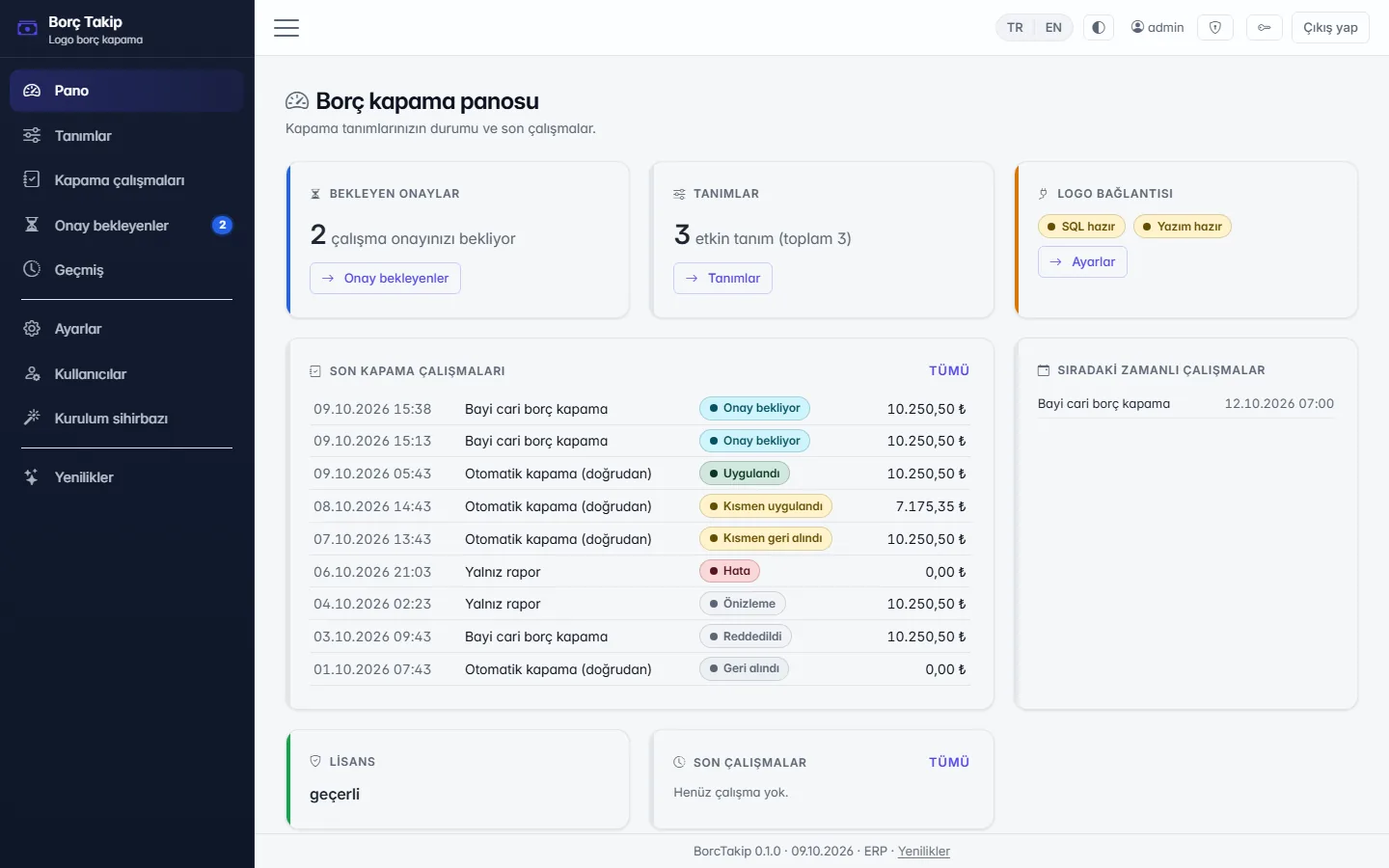
Dashboard: pending approvals, recent closing runs, upcoming scheduled runs (fictitious sample data)
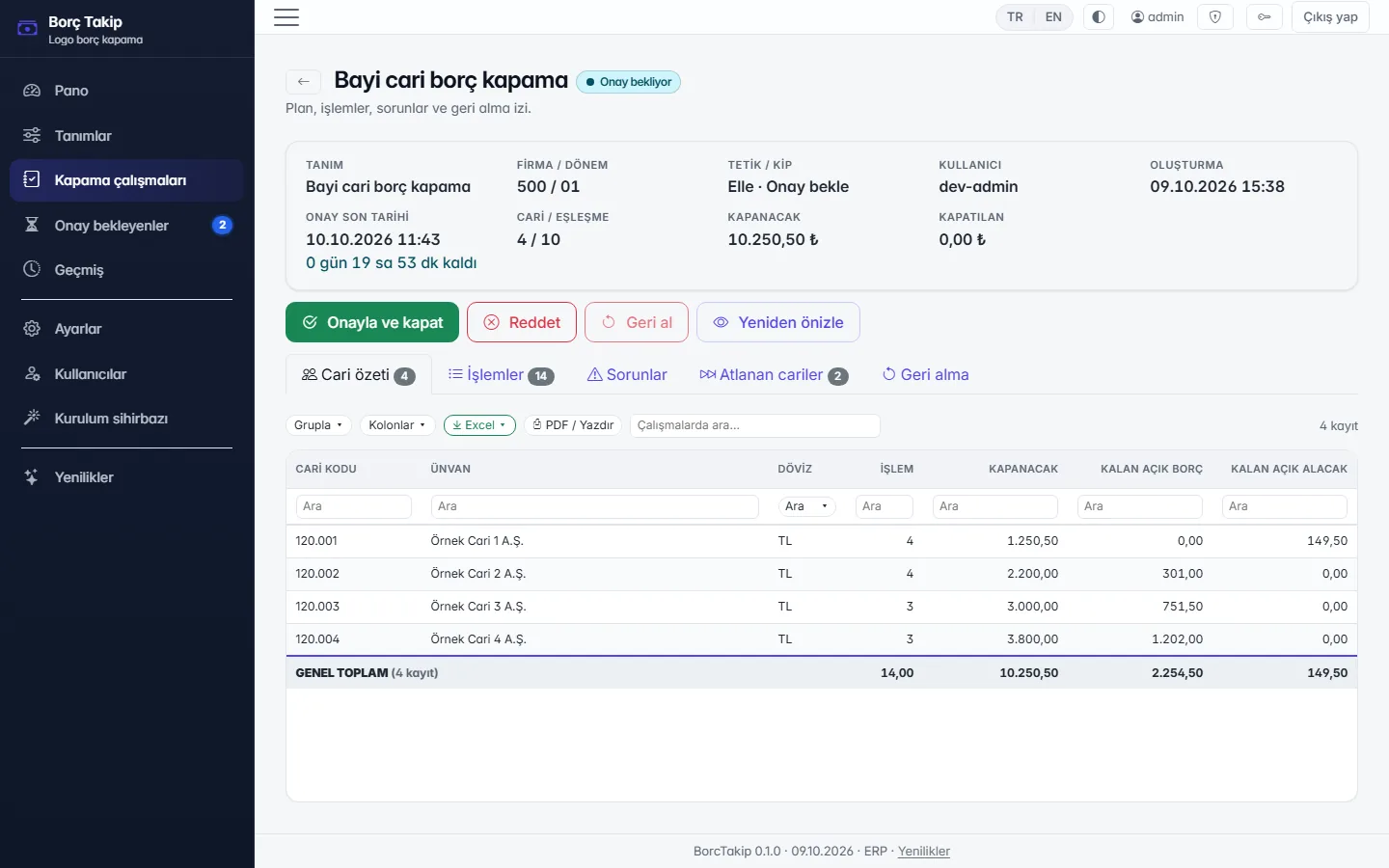
Run awaiting approval: account summary, amount to close and remaining open balances (fictitious sample data)
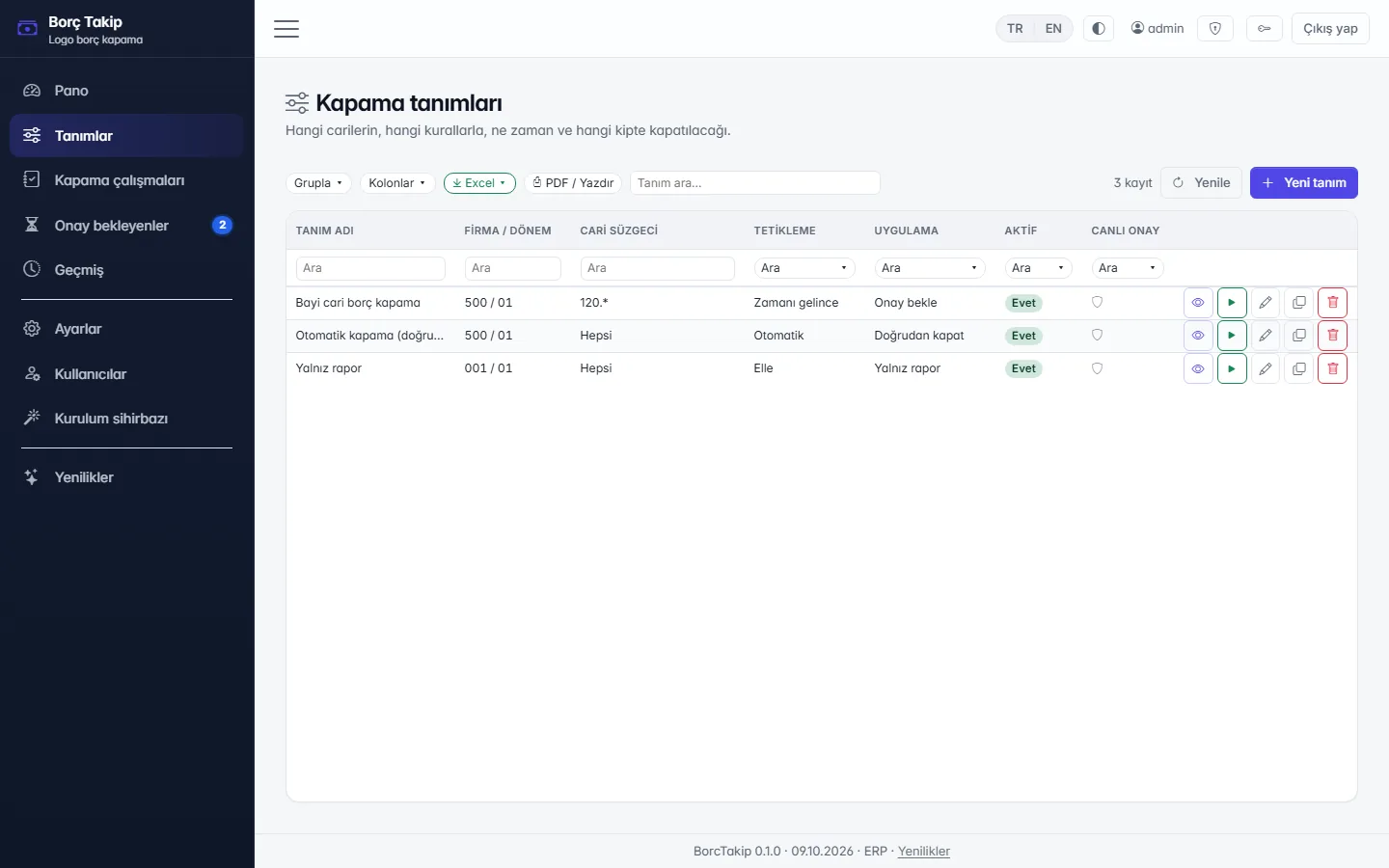
Closing definitions: filters, trigger and apply mode (fictitious sample data)

Today vs. with ERP Debt Tracker

Monthly debt closing

Today (manual / spreadsheets)Paid invoices still look open; closing takes hours of manual work every month and the aging report stays wrong.

With ERP Debt TrackerFor movements filtered by account code, group, special code, date and currency the plan is previewed per account; closing is scheduled or runs on its own when new candidate movements arrive.

Safe writes

Today (manual / spreadsheets)After a bulk close nobody is sure what changed; undoing a wrong match is hard.

With ERP Debt TrackerAt approval the plan is re-read from Logo; closing is done through Logo Objects with Logo's own FIFO function, never by writing to the database directly. For TL accounts an undo is compared document by document with the state before closing.

Reports and exceptions

Today (manual / spreadsheets)Records that could not be closed go unnoticed; results are shared by e-mail by hand.

With ERP Debt TrackerExcel/PDF reports and e-mail come ready; rows that could not be closed are listed with their reasons.

Frequently asked questions

Does it write to the Logo database directly?
No. Candidate transactions are only read from the database; closing is done through Logo Objects with Logo's own FIFO closing function, no different from closing by hand in Logo. The Logo user and Logo licence details are entered during setup.
Can a wrong closing be undone?
Yes, for TRY accounts and per run: the run's closings are undone in reverse order and the result is checked document by document against the state before closing. If another transaction was posted on the account after closing, that account is left alone and flagged for manual review. Logo keeps the closing date and history record after an undo. Undo for foreign-currency accounts is not available in this version.
Does it close foreign-currency accounts too?
Yes, if «also close foreign-currency accounts» is switched on in the definition; it is off by default. With currency separation on, each currency is matched within itself and TRY never mixes with foreign currency.
How is it installed, can I try it?
Download the installer from this page and run it on a Windows server with access to Logo. The setup wizard installs the Windows service and asks for the Logo connection and the first definition step by step. A 15-day trial licence starts automatically; previews need no licence.
What does it cost?
The product is in early access; request a quote with the form below.

Keep me informed

ERP Debt Tracker is not released yet. Shall we email you when it launches, or give you a call? Choose your channel.

How would you like to be informed? (one or both)

Apply for early access

The product is in pilot. Apply and we will share the early-access terms and pricing with you directly.

Ideas and suggestions

Would you like a feature in ERP Debt Tracker, have a suggestion or hit a problem? Tell us; the team reads every message and shapes the roadmap accordingly.

Type

Name and email are optional; leave an email if you would like us to get back to you.